
-
 Welcome bonusUp to 2 000 CAD + 100 FSfor the first 2 deposits
 -
 Welcome bonusUp to 2 000 CAD + 100 FSfor the first 2 deposits

WinSpirit Casino login
Getting into your account takes seconds. This page explains every access point, from the standard sign-in form to mobile entry, plus how registration, identity checks, and security all connect. Whether you’re a new player or returning after a break, understanding how the WinSpirit login page is structured will save you time. We run on a Curaçao licence, accept CAD natively, and keep our doors open around the clock — WinSpirit is always ready when you are. Our WinSpirit Casino is protected by SSL encryption and eCOGRA-certified systems, so every session you start is secure from the first click.
Accessing the Casino Lobby
The sign-in panel sits at the top-right corner of every page — you’ll see it the moment you land on the site. Enter your registered email address and password, then press the button to proceed. That’s all it takes for a returning player to get through the WinSpirit Casino login gate and reach the full lobby instantly.
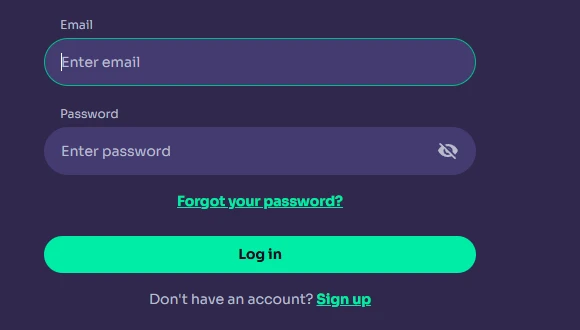
New visitors who haven’t created an account yet need to pick up the process from a different angle entirely. Head to online WinSpirit site and locate the registration button before attempting to sign in. Once credentials are in place, the WinSpirit Casino login experience is frictionless on every subsequent visit — no delays, no unnecessary steps.
Our platform accepts email-and-password combinations only; there is no social sign-in shortcut. If you registered under a specific currency such as CAD, your credentials are tied to that account and it cannot be merged with another currency account. The Win Spirit Casino login screen also supports password managers, so consider using one to keep your access fast and secure across every device you own. For players on the 777-variant entry page, the WinSpirit 777 login directs to the same authenticated environment with no separate dashboard.
The standalone brand identifier — WinSpirit — appears prominently in the tab and page header so you always know you’re in the right place. Our WinSpirit 777 casino login route is identical in form fields and credential requirements to the main portal; the URL path simply differs. Every route converges at the same secure session.
The Registration Flow Explained
Signing up is a three-minute process when you know the steps. All personal details entered during registration must exactly match your government-issued ID, because our verification team cross-checks this data later during KYC — mismatches delay withdrawals.
| Step | Action |
| 1 | Open the registration form via the Sign Up button |
| 2 | Enter your email, create a password, select Canada and your preferred currency (CAD recommended) |
| 3 | Choose your account currency — this cannot be changed later without opening a new account |
Once you submit the form, a confirmation email lands in your inbox within minutes. Click the link inside it to activate your account, then proceed straight to the WinSpirit login screen using the credentials you just set. Our WS Casino platform supports CAD as a native currency, meaning no conversion fees on Canadian deposits or withdrawals.
After activation, return to the main page and use Win Spirit Casino login to get in. The WinSpirit 777 login register link on the 777 entry page leads to the identical sign-up form — same fields, same process, same account. Explore the WinSpirit reward guide immediately after your first sign-in to see which welcome offers activate on your first deposit. The WinSpirit login step itself does not trigger any bonus; it is the deposit action after entry that activates rewards. We also recommend completing KYC as soon as your account is live rather than waiting until your first withdrawal request.
Completing the KYC Process
Uploading your identity documents early is the single most important action you can take after registering, because our KYC review is mandatory before any withdrawal is processed — skipping it delays cashouts by hours or days.
Here is what the process covers:
- KYC review — our team checks submitted documents within 2–24 hours of upload; you only go through this once
- Mandatory before first withdrawal — no payout is released until identity and payment method verification are both complete
- Age 18+ enforcement — proof of age is verified at this stage; accounts belonging to underage players are closed with winnings voided
The WinSpirit Casino login page does not gate your gaming sessions behind KYC — you can explore the lobby and play before verification completes. However, the moment you request a withdrawal, our system checks your verification status first. Complete it early through Profile → Verification to avoid any friction at payout time. Our WS Casino requires standard government-issued documents: passport, national ID card, driver’s licence, or residence permit — all must be valid for at least one more month at the time of upload. You can check your verification progress directly in your profile tab at any time, and our team will email you once the review is finished. Visit our WinSpirit questions answers page for a full step-by-step breakdown of document requirements. The Win Spirit login screen will always be available to you during this period — ongoing verification never locks you out of your account.
Using WinSpirit app login during the KYC phase is just as valid as desktop access; the verification tab is fully accessible in the mobile interface. The WinSpirit online casino login brings you directly to the same Profile → Verification path regardless of the device you’re using.
Help with Forgotten Passwords
Credential problems are the most common reason a sign-in attempt fails, and most of them are resolved in under two minutes. Hit the “Forgot Password?” link on the sign-in page, enter your registered email, and follow the reset instructions that arrive in your inbox.
Check these areas before contacting support:
- Check credentials — confirm Caps Lock is off and you’re entering the email tied to your registered account, not a secondary address
- Pending KYC — a flagged account status can sometimes appear as a login barrier; check your email for any outstanding document requests from our team
- Blocked account — repeated failed sign-in attempts trigger a temporary security hold; wait 15 minutes or contact Live Chat to lift it faster
- Clear cache — a corrupted browser session or outdated saved password can cause the form to reject valid credentials; clear cookies and try again
After resetting, the new password takes effect immediately. Go back to the sign-in screen and use your updated credentials to access the lobby. Win Spirit login issues tied to forgotten passwords are almost never permanent — our support team at Live Chat is available 24/7 to assist if the reset email doesn’t arrive within a few minutes.
If you’re on mobile and struggling, WinSpirit app login uses the same reset flow as desktop — no separate mobile-specific recovery path exists. Our WinSpirit 777 casino login portal also has its own “Forgot Password?” trigger that feeds into the same reset pipeline. The WinSpirit Casino is configured so that a successful password reset on any entry point updates the credentials site-wide immediately. Standalone WinSpirit account access resumes the moment the new password is confirmed.
Your Capabilities Post-Login
Once you’re in, the full platform opens up — slots, live tables, the cashier, sports betting, and every active bonus you hold are all reachable from the lobby without any additional steps.
| Feature | Location |
| Cashier (deposit & withdrawal) | Top menu — persistent across all pages |
| Live Chat support | Persistent widget — bottom-right corner, always visible |
| KYC & Verification | Profile → Verification tab |
| Active Bonuses | Profile → Bonuses section |
| Responsible Gambling Limits | Profile → Limits tab |
The cashier is the fastest route to activating your welcome package — it sits in the top navigation bar and is accessible within seconds of a successful sign-in. Win Spirit is built so that the session you open after the WinSpirit Casino login carries your full balance, bonus status, and VIP level in real time across every device you switch to. Cross-platform sync means a session started on desktop continues seamlessly on mobile.
Our WinSpirit app login experience mirrors the desktop view exactly — the same cashier, the same live lobby, and the same settings panel. With WinSpirit 777 login you land in the same authenticated environment post-session as the main URL. Using WinSpirit Casino app login on a PWA-installed version of the platform gives you a home-screen icon that opens directly to the sign-in page, cutting the steps between you and the game. Players who install the app also receive 20 no-deposit Free Spins plus an automatic VIP level upgrade — the offer activates once the app is installed and you sign in through it.
Safe Browsing and Sign-In
Using biometric logins on supported devices is the fastest and most secure way to authenticate your sessions — fingerprint and face-recognition unlocks on iOS and Android both work with our PWA.
Security measures in place at our platform:
- SSL encryption — every connection between your device and our servers is encrypted; all personal data and transaction details are protected in transit
- Strict name matching — the name on your account must match your government ID exactly; any discrepancy flags the account for manual review
- Biometric logins — iOS Safari and Android Chrome both support biometric unlock for saved passwords; enable this in your device settings for fast, secure access
- Two-factor options (2FA) — additional verification steps are available through your account security settings for players who want a second layer of protection
Always access our platform through the official URL rather than third-party links, and avoid signing in over public Wi-Fi without a VPN. The WinSpirit online casino login page uses HTTPS exclusively — if you see an HTTP-only address, do not proceed. Our Win Spirit Casino security framework has been audited by eCOGRA, meaning every element of the sign-in process meets independent verification standards. The WinSpirit login form itself will never ask for your CVV or full card number — if you see a page that does, leave immediately and contact us via Live Chat.
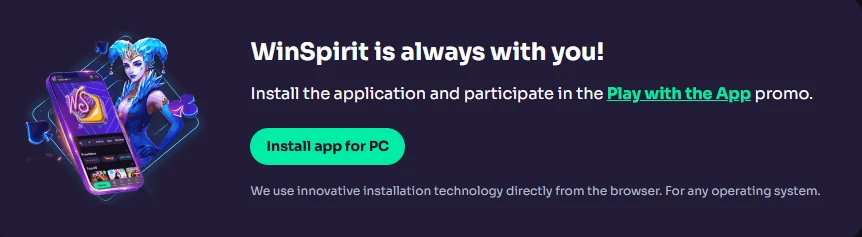
Completing the WinSpirit app login through the officially installed PWA is safer than using a browser bookmark, because the PWA loads directly from our verified origin without touching third-party redirect chains.
Who Is Login Support For
Every player who has ever struggled to get back into their account, missed a bonus because of a sign-in delay, or simply wanted to understand what happens after they authenticate will find the information on this page directly useful.
Newer players benefit most from understanding the registration sequence and KYC requirements before they start, because front-loading that work removes every withdrawal barrier before it appears. High-volume players and VIPs gain the most from biometric logins and the post-login cashier table — speed matters when you’re managing multiple active bonuses or chasing a live-table session. Canadian players in particular should note that our platform natively supports Interac and CAD, so the account dashboard they see after their WinSpirit Casino login reflects local currency limits without any manual conversion. Anyone who has experienced a blocked account or a failed Win Spirit Casino login should work through the troubleshooting list in the section above before reaching out to Live Chat — most issues resolve without support involvement. Win Spirit and its full platform are here for you every hour of every day.
Frequently Asked Questions
How Do I Sign in on a Mobile Device?
Open the site in your mobile browser, tap the sign-in button at the top of the page, and enter your registered credentials. The process is identical to desktop. If you’ve installed our PWA, tap the home-screen icon and it opens directly to the Win Spirit Casino login form for even faster access. Biometric unlock on iOS and Android works through your saved browser password — enable it in device settings once and every future session opens with a fingerprint or face scan.
What Happens If My Account Gets Temporarily Locked?
A temporary hold triggers automatically after several consecutive failed sign-in attempts as a security measure. Wait 15 minutes and try again, or contact Live Chat to have the hold lifted immediately. Our agents are available around the clock. Once the hold is cleared, your access and balance are completely unaffected — the lock only prevents sign-in attempts; it does not touch your funds or bonus status.
Can I Access My Account from Multiple Devices?
Yes. Our platform syncs in real time across all devices you use. A session started on desktop continues on mobile without any data loss — balance, bonus status, and game progress all update instantly. However, we permit one account per person only; using multiple accounts from the same household or IP address violates our terms and may result in account suspension.
How Long Does a Password Reset Take?
The reset email arrives within a few minutes of submitting your registered address on the “Forgot Password?” page. Click the link inside, create a new password, and use it immediately at the sign-in screen. If the email hasn’t arrived after five minutes, check your spam folder. Still nothing? Contact Live Chat and our team will verify your identity and push a manual reset right away.
Is There a Separate Sign-in Page for the Mobile App?
No separate page exists. Our PWA uses the same authentication system as the full site — the sign-in form simply adapts to fit your screen. Tapping the installed app icon on your home screen loads that form directly, skipping browser navigation entirely. All bonuses, including the 20 no-deposit Free Spins awarded on app installation, are visible and claimable from the same post-login dashboard you see on any other device.
Why Is Verification Required Before My First Withdrawal?
Identity checks protect you and the platform from fraud and money laundering, and regulators under our Curaçao licence require them for all operators. You submit your documents once through Profile → Verification, our team reviews them within 2–24 hours, and that clears every future withdrawal automatically. There is no repeat submission required unless your document expires or our team requests an update. Starting the process immediately after registration is the fastest path to unrestricted cashouts.